Tampilkan postingan dengan label smartbro bill online. Tampilkan semua postingan

Senin, 17 Oktober 2011

How to pay smartbro bill online?

How to pay smartbro online?
Last time, I made a post about another way to get a copy of smartbro bill of statement online in case you won't receive thru your mail address. Now, I would like to share on you how to pay smartbro bills online. Since most of banks in the Philippine offers now an internet banking, we can easily to pay our bills via online. It's up to you which internet banking would you like to use for payment.

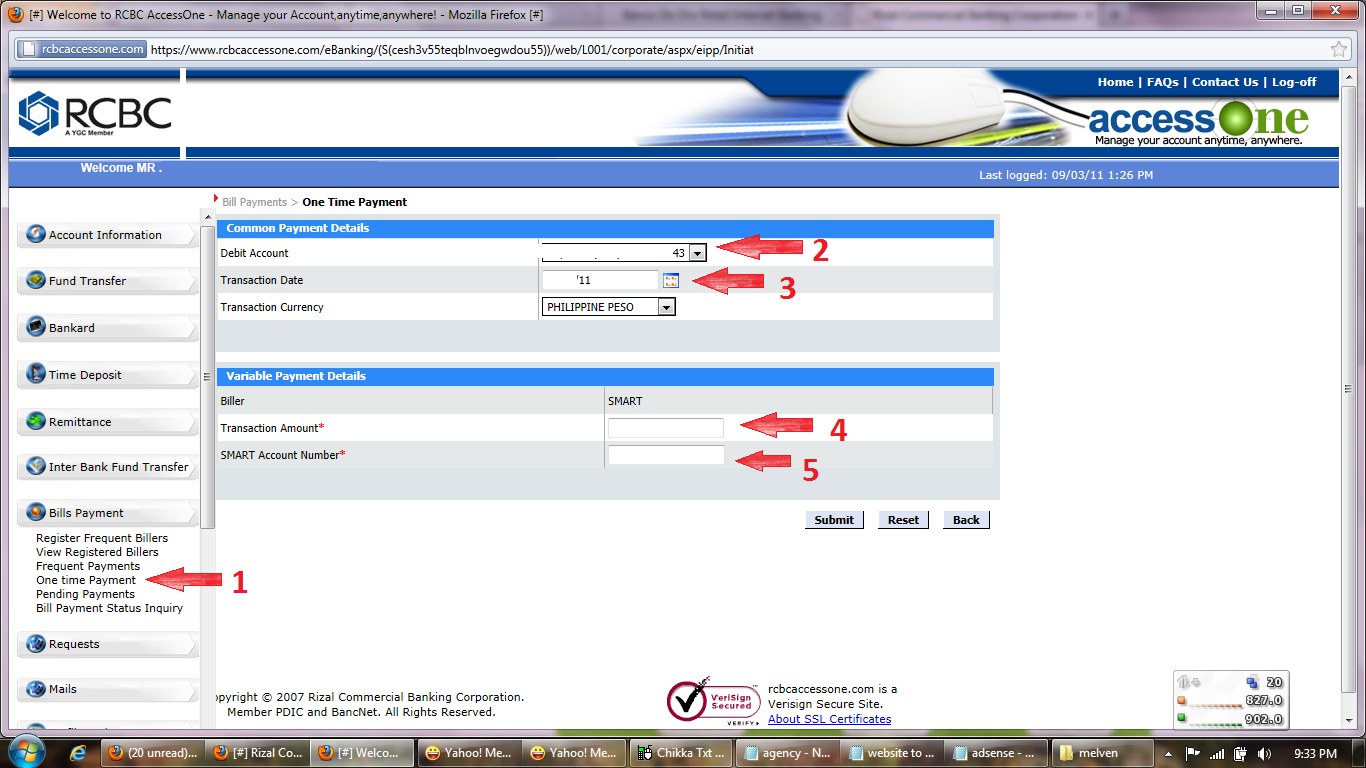
Here, I'm going to use BDO Online Banking to pay smartbro bill online. And for additional information, I will also show you some print screen photo of how to pay smartbro online using Metrobank Direct Online Banking and RCBC Access One Online Banking.
To pay smartbro online. (I suppose you have already registered your BDO bank savings account in the internet). All you have to do. Here's how:
1. Go to BDO website or type in to your browser www.bdo.com.ph and then Log in to your BDO Online account. 

Smartbro bill

2. Enroll your smartbro account. Go to enrollment services then company/biller name and then click enroll. See screen shot below.

Smartbro bill

3. From company/biller name select smart, for product type select smartbro. Fill up your information in a space provided box for smartbro account number, subscriber name and nickname for the enrollment name. Then click submit. See screen shot below.

Smartbro bill
4. After the enrollment, you can now pay your smartbro bills. Click pay bills. Select the company/biller name you've enroll. Then fill up the amount you need to pay. Put some remarks. Then click submit. See screen shot below.

Smartbro bill

Smartbro bill

5. After clicking submit button. A payment receipt will show up telling that you have successfully paid your smartbro bills. In the receipt, included the detail of your payment such smartbro payment reference number, date and amount paid. Make a copy or print so that you have a copy to keep. See screen shot below.

Smartbro bill

6. Wait for 24 - 48 hours to credit your smartbro payments. To check if your payment has been credited. You may log in to www.smart.com.ph and then look for your smartbro bill of statement to make sure your payment has been credited.
As I mentioned above. I will show you some print screen photo using Metrobank and RCBC to pay smartbro bills online. It is same procedure, the one I explained above. Enroll first the company name and then after enrollment you can proceed for payment. See screen shot below.

Smartbro bill

Smartbro bill

Here you go, I hope you've gain an idea on how to pay smartbro online. If you have any question, you can contact me. Or directly visit the website of your bank for inquiry.


Next to read...

Sabtu, 15 Oktober 2011

How to check smartbro bill online?

How to check smartbro bill online?
Is there an alternative way to view/check my SmartBro billing statement? Yes, there is. Last month when my sister text me and asking for a money to pay our Smartbro monthly bill in bayad center. I told to her send me a scan copy of smartbro bill of statement so that I can view how much exactly I had to pay. But the problem is, she said, she have not yet receive any copy of smartbro bill of statement to our mail address. She go to our town post office to check if there's already a mail from smart.

Unfortunately, she found nothing. To find out how much I had to pay. I browse the internet and visit www.smart.com.ph website. And I found that our mobile number and even smartbro account can be register to their site. And can access the following detail.
For Mobile Subscribers
* Check Balance
* View and pay bills
* Activate Services
* Monitor account activity
* Submit help tickets
For Smart Reload Retailers
* Check Load Wallet balance
* Request for statement of account
* Block Load Wallet for lost SIM
For SmartBro Subscribers
* Smartbro Check balance
* View Smartbro bills of statement
* Subscribe to unlisurf package
* Submit help tickets
I decided to register my sister smartbro account so that we don't need to wait to come in our mail address the smartbro bill of statement.  And if I need a copy. All I have to do is just log in to smart website, click check the Smartbro bill of statement to find out our due date and how much should i pay and then print a copy for me. It easy to use anytime and anywhere as long as you have internet connection.
To register and to check you smartbro bill of statement. Here's how:
1. Go to www.smart.com.ph and then click manage my account from upper right side corner of smart homepage. You will prompt to a smart log in portal. See smartbro snapshot photo.

Smartbro bill

2. Click, Register Now.  Then fill up and give the necessary information needed (for smartbro registration use the smartbro reference number). You will receive a confirmation email link. Click that link you've receive and continue fill up the form until you finish. See smartbro snapshot photo.

Smartbro bill
  
Smartbro bill
 
3. After clicking the submit button. You will receive again an email telling that you have successfully register your account. You can now log in by using username or your smartbro account number and password you've provide during registration. Then, manage and check the bill of statement of your mobile and smartbro account. See smartbro snapshot photo.

Smartbro bill

Smartbro bill

Smartbro bill

Smartbro bill

4. Once you're already log in to smartbro portal you can now explore, view and check your smart bro bill of statement as shown picture above.


Next to read....